I once treated renaming an ApplicationSet as a config change. It is not.
There is no rename verb in Kubernetes.
metadata.name is identity, so a rename is a delete plus a create - and with an ApplicationSet,
the delete takes the workloads with it.
If you are here mid-incident: do not kubectl delete applicationset. Use:
kubectl delete applicationset <old-name> -n argocd --cascade=orphan
kubectl apply -f <new-appset>.yaml
--cascade=orphan leaves the generated Application resources in place.
Without it, Kubernetes garbage-collects them through their ownerReferences, the Argo CD
finalizer runs, and your live workloads go with them.
If the ApplicationSet is managed from Git by a parent Application, read
When the ApplicationSet lives in Git first - there the
trigger is a prune, not a kubectl delete.
Everyone else: the interesting part is not the flag. It is that a config object had the authority to delete running services - and that you can watch it happen on your laptop in ten minutes.
Reproduce it
This takes a throwaway kind cluster, a default Argo CD install and the
public argocd-example-apps guestbook. Setup
commands and ready-to-apply manifests are in
lab/argocd-applicationset-rename.
Install Argo CD with --server-side.
Client-side apply stores the whole object in the last-applied-configuration annotation, and the
ApplicationSet CRD is bigger than the 256 KB annotation limit.
Nothing below depends on how you got the cluster. Every output is copied verbatim from one run: Argo CD v3.5.1, Kubernetes v1.36.1, kind v0.32.0.
The ApplicationSet
under test,
appset-demo.yaml,
generates two Applications from a list:
# appset-demo.yaml
apiVersion: argoproj.io/v1alpha1
kind: ApplicationSet
metadata:
  name: demo-old
  namespace: argocd
spec:
  goTemplate: true
  goTemplateOptions: ["missingkey=error"]
  generators:
    - list:
        elements:
          - name: one
          - name: two
  template:
    metadata:
      name: "demo-{{.name}}"
      finalizers:
        - resources-finalizer.argocd.argoproj.io
    spec:
      project: default
      source:
        repoURL: https://github.com/argoproj/argocd-example-apps.git
        targetRevision: HEAD
        path: guestbook
      destination:
        server: https://kubernetes.default.svc
        namespace: "demo-{{.name}}"
      syncPolicy:
        automated: {}
        syncOptions:
          - CreateNamespace=true
kubectl apply -f appset-demo.yaml
kubectl -n argocd wait --for=jsonpath="{.status.health.status}"=Healthy \
  application/demo-one application/demo-two --timeout=300s
Two Applications, both owned by the ApplicationSet, both carrying the finalizer:
$ kubectl get application -n argocd -o custom-columns=\
"NAME:.metadata.name,OWNER:.metadata.ownerReferences[0].name,FINALIZER:.metadata.finalizers[0]"
NAME       OWNER      FINALIZER
demo-one   demo-old   resources-finalizer.argocd.argoproj.io
demo-two   demo-old   resources-finalizer.argocd.argoproj.io

$ kubectl get deploy -A | grep demo-
demo-one    guestbook-ui   1/1   1   1   58s
demo-two    guestbook-ui   1/1   1   1   58s
That ownership edge is worth looking at in full. The uid is what the garbage collector follows:
delete the object with that UID, and everything pointing at it is deleted too.
$ kubectl get application demo-one -n argocd -o jsonpath="{.metadata.ownerReferences}"
[{"apiVersion":"argoproj.io/v1alpha1","blockOwnerDeletion":true,"controller":true,
  "kind":"ApplicationSet","name":"demo-old","uid":"68ed48a8-a24d-4829-8a4c-9acf742ccb80"}]
The naive rename
$ kubectl delete applicationset demo-old -n argocd
applicationset.argoproj.io "demo-old" deleted
One line of output. One object deleted. No warning, no confirmation prompt, no mention of the two Applications that just inherited a death sentence.
Look immediately and you catch the cascade in flight - deletionTimestamp set on both
Applications, and the Deployments already being torn down:
$ kubectl get application -n argocd -o custom-columns=\
"NAME:.metadata.name,DELETING:.metadata.deletionTimestamp,SYNC:.status.sync.status"
NAME       DELETING               SYNC
demo-one   2026-08-21T14:14:09Z   OutOfSync
demo-two   2026-08-21T14:14:09Z   OutOfSync

$ kubectl get deploy -A | grep demo-
demo-one    guestbook-ui   0/1   0   0   72s
demo-two    guestbook-ui   0/1   0   0   72s
Seconds later there is nothing left to look at:
$ kubectl get application -n argocd
No resources found in argocd namespace.

$ kubectl get deploy -A | grep demo-
$ kubectl get pods -n demo-one
No resources found in demo-one namespace.

$ kubectl get ns | grep demo-
demo-one   Active   87s
demo-two   Active   87s
The same thing, done safely
Rebuild the demo, note which pod is running, and this time pass the flag:
$ kubectl get pods -n demo-one -o custom-columns="POD:.metadata.name,START:.status.startTime"
POD                             START
guestbook-ui-5d6468fd55-d66mx   2026-08-21T14:14:43Z

$ kubectl delete applicationset demo-old -n argocd --cascade=orphan
applicationset.argoproj.io "demo-old" deleted

$ kubectl get applicationset -n argocd
No resources found in argocd namespace.

$ kubectl get application -n argocd -o custom-columns=\
"NAME:.metadata.name,OWNER:.metadata.ownerReferences[0].name,SYNC:.status.sync.status,HEALTH:.status.health.status"
NAME       OWNER    SYNC     HEALTH
demo-one   <none>   Synced   Healthy
demo-two   <none>   Synced   Healthy

$ kubectl get pods -n demo-one -o custom-columns="POD:.metadata.name,START:.status.startTime"
POD                             START
guestbook-ui-5d6468fd55-d66mx   2026-08-21T14:14:43Z
Same pod, same start time. The ApplicationSet is gone, the Applications are still Synced and
Healthy, and nothing in the workload noticed.
The OWNER column now reads <none>. That is the success condition: the ApplicationSet is gone
and its Applications outlived it.
An orphaned Application is not broken. Argo CD keeps reconciling it, the workloads keep running,
sync keeps working - it simply behaves like an Application somebody created by hand. What is gone
is control over its existence: nothing will recreate it if it is deleted, and nothing will push
template changes into it.
So this is a safe place to stand, but not a safe place to stay. Do not stop here.
Now apply the renamed appset. It differs from the original by exactly one line:
 metadata:
-  name: demo-old
+  name: demo-new
   namespace: argocd
$ kubectl apply -f appset-demo-new.yaml
applicationset.argoproj.io/demo-new created

$ kubectl get application -n argocd -o custom-columns=\
"NAME:.metadata.name,OWNER:.metadata.ownerReferences[0].name,SYNC:.status.sync.status,HEALTH:.status.health.status"
NAME       OWNER      SYNC     HEALTH
demo-one   demo-new   Synced   Healthy
demo-two   demo-new   Synced   Healthy

$ kubectl get pods -n demo-one -o custom-columns="POD:.metadata.name,START:.status.startTime"
POD                             START
guestbook-ui-5d6468fd55-d66mx   2026-08-21T14:14:43Z
Still demo-one and demo-two - adopted, not recreated. Still the same pod from before the
rename, started at 14:14:43Z and never interrupted. The ownership edge now points at a different
object entirely:
$ kubectl get application demo-one -n argocd -o jsonpath="{.metadata.ownerReferences[0]}"
{"apiVersion":"argoproj.io/v1alpha1","blockOwnerDeletion":true,"controller":true,
 "kind":"ApplicationSet","name":"demo-new","uid":"48021c3c-f1af-4435-84fa-3bde904b5b22"}
Different name, different uid, same running workload. That is what a rename should look like.
Adoption works here because template.metadata.name does not reference the ApplicationSet name,
so the generated names never moved. That is the condition to check before you try this for real -
see the second trap below.
Why it happens
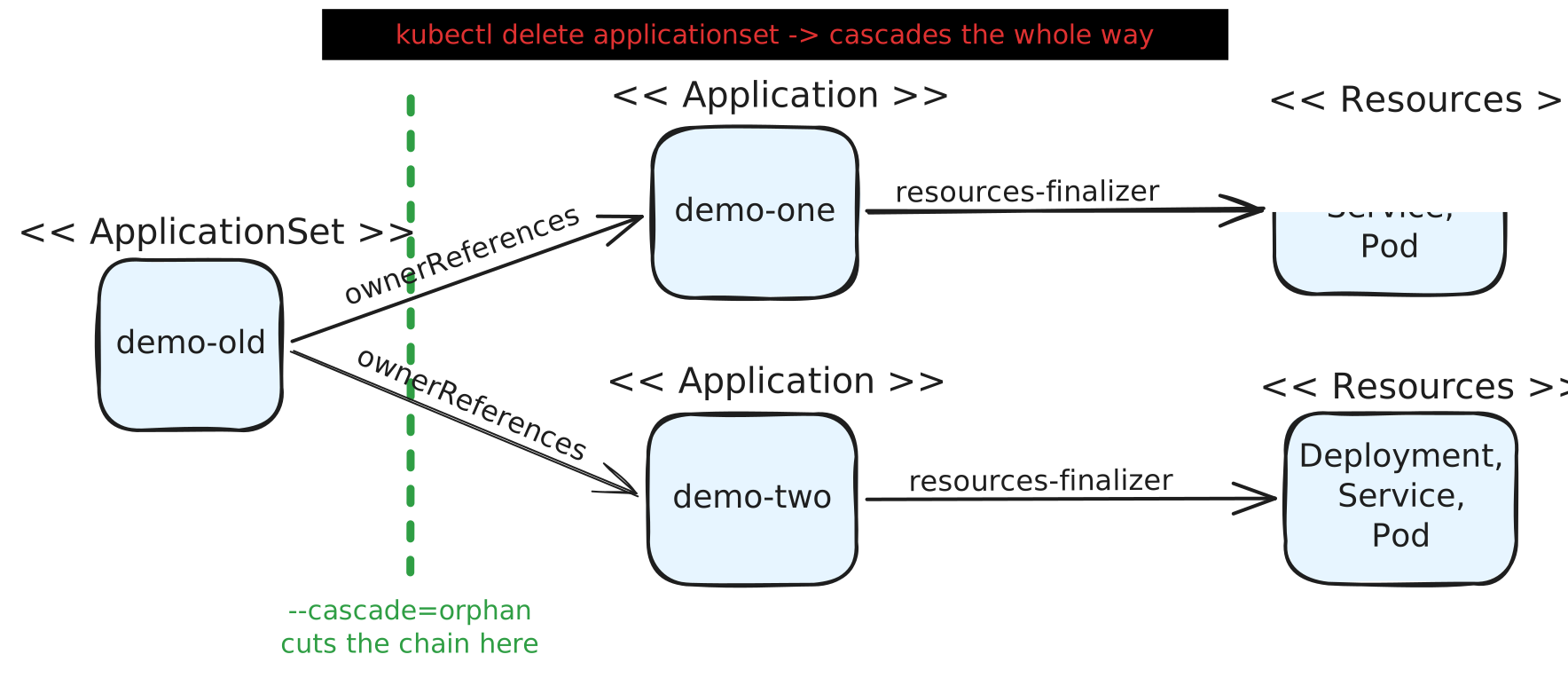
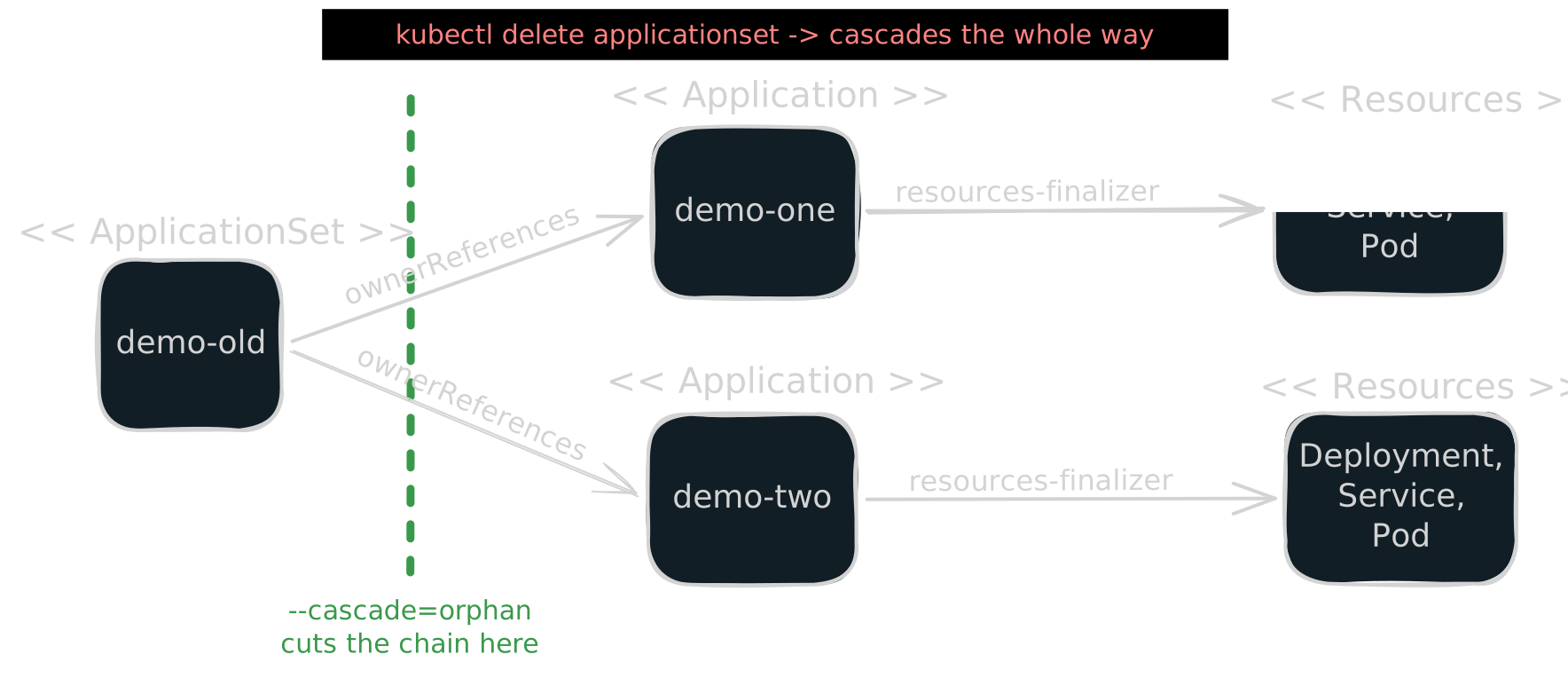
Three links in one chain:
-
An ApplicationSet owns the Applications it generates.
Each generated
Applicationcarries anownerReferencesentry pointing at theApplicationSetUID. Not a label. Not a convention. An actual Kubernetes ownership edge. -
Kubernetes garbage-collects owned objects.
Delete the owner and the API server deletes the dependents. The default propagation policy is
Background- it does not ask. -
Deleting an Application is a sync operation, not bookkeeping.
With the finalizer
resources-finalizer.argocd.argoproj.io, deleting the Application tells Argo CD to prune the live resources it manages - Deployments, Services, Ingresses, the running thing.
Check yours:
kubectl get application -n argocd <app> -o jsonpath="{.metadata.ownerReferences}"
kubectl get application -n argocd <app> -o jsonpath="{.metadata.finalizers}"
That third link decides your blast radius. Without the finalizer, deleting an Application abandons its resources - they keep running, unmanaged. With it, they are pruned. Neither outcome is what “I am renaming a config object” led me to expect, but only one of them is an outage.
You can prove the finalizer is the deciding factor with a short experiment. Orphan the
Applications first, so the ApplicationSet controller does not recreate what you delete. Then strip
the finalizer from one Application, leave it on the other, and delete both:
$ kubectl delete applicationset demo-new -n argocd --cascade=orphan
applicationset.argoproj.io "demo-new" deleted

$ kubectl patch application demo-one -n argocd --type=merge -p "{\"metadata\":{\"finalizers\":null}}"
application.argoproj.io/demo-one patched

$ kubectl get application -n argocd -o custom-columns=\
"NAME:.metadata.name,FINALIZER:.metadata.finalizers[0]"
NAME       FINALIZER
demo-one   <none>
demo-two   resources-finalizer.argocd.argoproj.io

$ kubectl delete application demo-one -n argocd
application.argoproj.io "demo-one" deleted
$ kubectl get deploy -n demo-one
NAME           READY   UP-TO-DATE   AVAILABLE   AGE
guestbook-ui   1/1     1            1           35s

$ kubectl delete application demo-two -n argocd
application.argoproj.io "demo-two" deleted
$ kubectl get deploy -n demo-two
No resources found in demo-two namespace.
Same command, same object kind, opposite outcome. One finalizer is the entire difference between an abandoned workload and a deleted one.
The second trap: the new ApplicationSet must generate identical names
Orphaning is only half the fix.
The new ApplicationSet adopts the orphans - but only those whose generated names match
exactly. An Application whose name changes is not adopted; a fresh one is created and the orphan
is left behind, ownerless and no longer managed by any ApplicationSet.
So renaming the ApplicationSet while also changing anything that feeds the name template - the
generator, its parameters, the naming convention - turns one reversible step into two coupled
ones.
Rename and re-path are two changes. Do them in two steps.
The safe procedure
# 0. Snapshot for diffing and forensics. Rollback is the old manifest in Git:
#    a `get -o yaml` dump carries uid and resourceVersion and does not re-apply as-is.
kubectl get applicationset -n argocd <old-name> -o yaml > appset-old.yaml
kubectl get application -n argocd -o yaml > apps-before.yaml
kubectl get application -n argocd -o name | sort > names-before.txt

# 1. Orphan the children, remove the parent.
kubectl delete applicationset <old-name> -n argocd --cascade=orphan

# 2. Verify NOTHING moved: same names, nothing deleting, still Synced and Healthy.
kubectl get application -n argocd -o name | sort | diff names-before.txt -
kubectl get application -n argocd -o custom-columns=\
"NAME:.metadata.name,DELETING:.metadata.deletionTimestamp,SYNC:.status.sync.status,HEALTH:.status.health.status"

# 3. Apply the renamed appset.
kubectl apply -f appset-<new-name>.yaml

# 4. Verify adoption: ownerReferences now point at the NEW appset UID.
kubectl get application -n argocd \
  -o custom-columns="NAME:.metadata.name,OWNER:.metadata.ownerReferences[0].name"
Step 2 is the one people skip.
It is also the only step that tells you whether you are about to have an incident. Every
DELETING cell must read <none> - during a cascade the names are still there for a few seconds,
so the name diff alone can pass while the workloads are already going.
When the ApplicationSet lives in Git
Everything above uses kubectl by hand. In a GitOps setup the ApplicationSet is usually a
resource of a parent Application (app-of-apps), and the rename is a commit. Same trap, different
trigger: when the parent syncs with pruning enabled, it prunes demo-old because Git no longer
has it. A prune is a delete with the parent’s
PrunePropagationPolicy,
which defaults to foreground. The cascade runs exactly as in the naive rename, and nobody typed
kubectl delete.
It even looks like it worked. The renamed ApplicationSet arrives in the same sync, finds the names
free once the cascade has run, and generates demo-one and demo-two again. Every workload was
deleted and recreated - new pods, fresh Deployments - and the only trace is an AGE column that
starts from zero.
Orphaning by hand does not help either: with selfHeal on, the parent puts the deleted
ApplicationSet straight back.
Make the parent orphan instead of cascade:
# parent Application
spec:
  syncPolicy:
    syncOptions:
      - PrunePropagationPolicy=orphan
Get this option live on the parent first, then commit the rename. With it, the same one-commit
rename keeps the pods running: the parent prunes the old ApplicationSet without touching its
Applications, and the new one adopts them.
For the few seconds both exist, the new ApplicationSet reports
Object argocd/demo-one is already owned by another ApplicationSet controller demo-old and leaves
the Application alone. That error is harmless - it clears as soon as the old one is gone. Verify
the result exactly as in step 2 of the procedure.
The sync option applies to every prune that parent does. For a parent that holds nothing but ApplicationSets, that is a reasonable permanent setting.
Belt and braces
Two fields on spec.syncPolicy of the ApplicationSet limit the damage in advance - each against a
different failure:
preserveResourcesOnDeletion: true- stops theApplicationSetcontroller from adding the resources finalizer to the Applications it generates, so deleting them abandons the workloads instead of pruning them. This is the one that turns a forgotten--cascade=orphaninto an inconvenience instead of an outage - but only if the template does not list the finalizer itself. The controller adds it by default anyway, so drop it fromtemplate.metadata.finalizers: an explicit finalizer there wins overpreserveResourcesOnDeletion, and the workloads are pruned as if the field were not set. Confirm the finalizer is really gone with the check from Why it happens.applicationsSync- acceptscreate-only,create-update,create-deleteorsync.create-onlyandcreate-updatestop theApplicationSetcontroller from deleting Applications that drop out of the generator output - useful while editing generators in place. It does not stop Kubernetes garbage collection when theApplicationSetitself is deleted. It is honored by default, unless the operator set a controller-wide policy and disabled per-ApplicationSet overrides.
Confirm the fields exist on your version rather than trusting a blog post - the CRD is the source of truth:
kubectl get crd applicationsets.argoproj.io -o jsonpath=\
"{.spec.versions[0].schema.openAPIV3Schema.properties.spec.properties.syncPolicy}"
Neither replaces --cascade=orphan.
They are the seatbelt for the day you forget it.
If you are already stuck
Applications sitting in Terminating are blocked on a finalizer that cannot complete - the
destination cluster is unreachable, a managed resource has a finalizer of its own, or Argo CD lost
the permissions it needs to prune.
To release one:
kubectl patch application <name> -n argocd --type=merge -p "{\"metadata\":{\"finalizers\":null}}"
When you are done with the lab, the whole thing goes away with the cluster:
kind delete cluster --name argolab
Takeaways
- In Argo CD, deleting an Application that carries the resources finalizer is a sync
operation. It reaches into the cluster. Treat every
deleteon an Argo CR as a production change, not a config edit. metadata.nameis identity. Kubernetes has no rename verb - only delete and create, and something has to survive in between.--cascade=orphanis the survival mechanism. Learn it before you need it.- Check the finalizer. It is the difference between orphaned resources and deleted ones.
- Rename and re-path in separate steps. Coupled changes make the blast radius unknowable.
- In Git, a rename is a prune. Set
PrunePropagationPolicy=orphanon the parent before you commit it. - If your GitOps tool is applied by hand, you are the reconciler. Write the runbook.